What happens at the counter
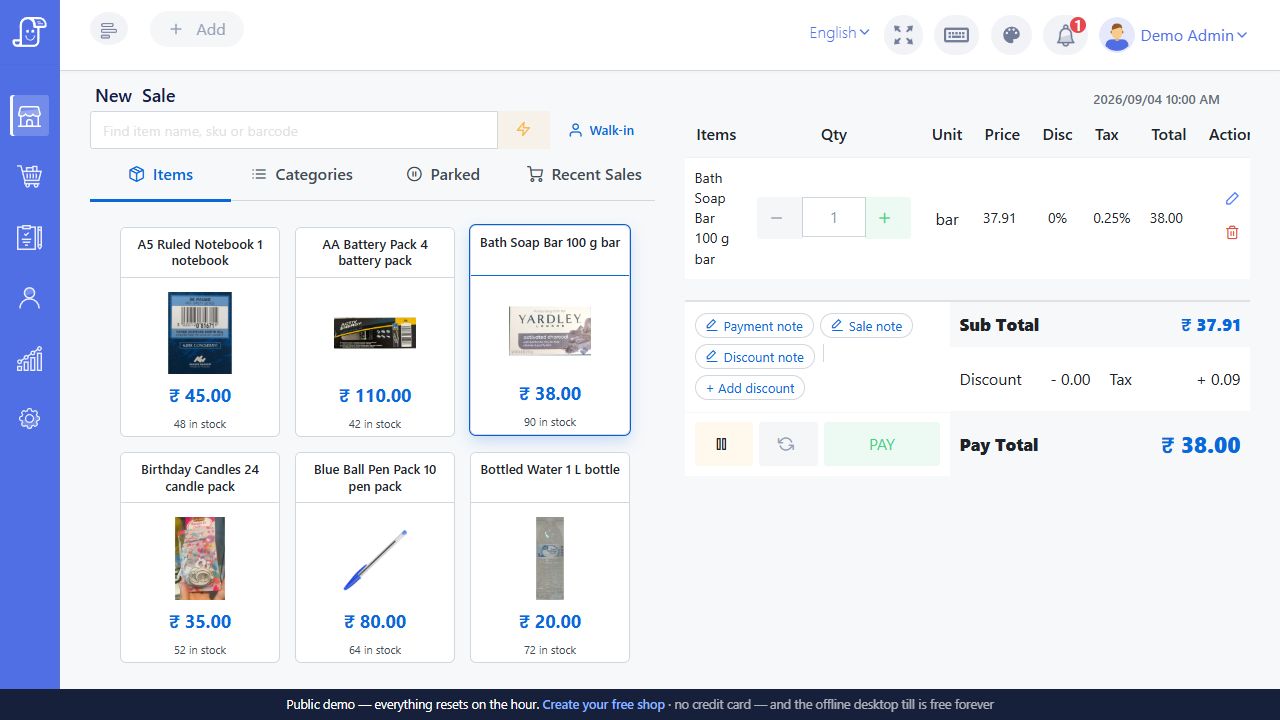
The cashier can search for a product or enter its barcode, choose the quantity and review the bill before collecting payment. Posnic’s selling workflow includes discounts, held sales and part payments. Which controls staff use should follow your shop’s rules: a cashier should know when to ask the manager before changing a price.
A scanner does not create an accurate catalogue by itself. Each barcode needs to point to the correct product or variant. A single bottle, a multipack and a larger bottle should be distinguishable before the first customer reaches the till.
For a grocery shop, follow the mixed-basket grocery billing demo through packets, loose goods and stock checks.
Bring a small, awkward basket to the demo
Choose five real products: a familiar fast seller, a similar product in another size, an item without a barcode, a damaged label and an item sold in more than one quantity. Use the scanner you intend to keep. Ask the demonstrator to find each product and explain how the cashier recovers when a scan does not match.
- Scan the same product twice and check the quantity and total.
- Change a quantity before saving the bill.
- Search manually when the label cannot be read.
- Hold a bill, serve another customer and return to it.
- Complete a sale and find it again in sales history.
Check your scanner and receipt together
Posnic documents keyboard-style barcode scanners and thermal receipt printing. Compatibility still depends on the actual scanner mode, computer, printer connection and receipt width. Send the model details before purchasing new equipment. A working scanner and an unreadable receipt would leave half the checkout problem unsolved.
Test a long product name and a larger basket on paper. Staff should be able to identify quantities, discounts and the amount collected without guessing. Ask how a duplicate receipt is identified when a customer requests another copy.
Use the printer and scanner checklist to record your models, sample output and unresolved compatibility questions.
Connect checkout with stock
A successful sale should be visible in sales history and reflected in the relevant stock records. During your demo, start with a known quantity, sell two units and inspect the result. Then discuss your return process. This small exercise is more useful than comparing software by the number of buttons on its billing screen.
Read about inventory management before preparing opening stock. For the wider shop workflow, start with shop billing software.
When a scan fails, separate the label from the catalogue
A beep only tells you that the scanner reacted. Before accepting the basket line, compare the displayed product, pack size, quantity and selling price with the item in your hand. Use this sequence on a training basket so a diagnosis does not become an unintended live sale.
Swipe the table, or focus it and use arrow keys, to read all columns.
| What you see | What to check | Before continuing |
|---|---|---|
| Nothing reaches the bill | Confirm the billing input has focus. For a keyboard-style scanner, test the label in a plain text field to see whether it produces the expected characters. | If no characters appear, investigate the label, cable, scanner mode and device setup before changing product records. |
| Characters appear, but no product is found | Compare the scanned value with the intended catalogue record, including leading zeros and any unexpected extra characters. | Find the product by name and confirm its size. Ask the person responsible for the catalogue to correct the mapping. |
| The wrong size or item appears | Check which product or variant owns that code. Similar packaging is not evidence that two packs share the same stock unit. | Correct the basket line and resolve the catalogue mismatch before relying on that label again. |
| One physical item becomes quantity two | Check for a second trigger, a repeated scan or an existing basket line before scanning again. | Compare the physical count with the basket, correct the quantity and test one deliberate scan at a time. |
Do not replace an unknown item with a similarly priced product just to finish checkout: that can make the bill look plausible while moving the wrong stock. Your shop should have an agreed manual lookup and manager-review process for unresolved items. These are diagnostic checks, not a promise that every scanner or barcode format is supported.
Test similar packs without mixing their stock
Use an illustrative training catalogue with separate 250 g and 500 g packs of the same product. Give each its actual product identity and verified label mapping. Start with ten of the small packs and six of the large packs, then put two small packs and one large pack in the basket.
Before saving, check that the receipt names the sizes clearly and shows quantities of two and one. After saving the training sale, the expected remaining quantities are eight small packs and five large packs, assuming no other stock movements. A total count of thirteen alone is not enough: it would hide a sale assigned to the wrong pack.
Keep one damaged-label item in the test as well. Find it manually and verify the same product identity rather than creating a second catalogue record. If you sell both individual pieces and sealed cartons, ask how the chosen setup represents each selling unit; do not assume scanning a carton automatically deducts its contents.
Record the observed match, receipt and stock result in the blank barcode catalogue check worksheet (CSV). The worksheet contains test prompts, not customer transactions. Review unresolved rows before preparing your opening catalogue and stock.
About these product details
Bill Pondy is a white-label offering of Posnic POS with the restaurant module. This page draws on the product documentation and source reviewed on . Confirm the installed version, enabled modules and your equipment in the demo.