
Follow a product from purchase to sale
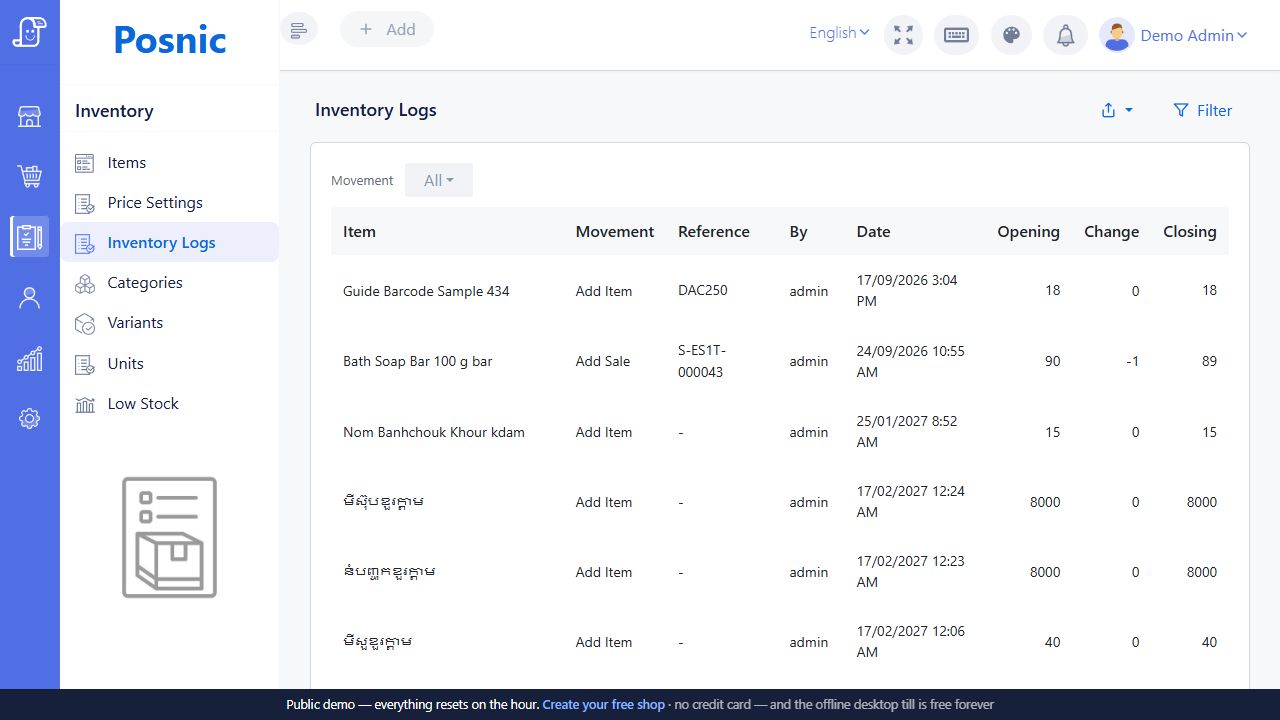
Retail stock moves through receiving, selling, returns and corrections. Posnic includes purchases, supplier returns, item and variant records, stock movement logs and a low-stock view. These give your team places to record what happened instead of relying on the quantity remembered from yesterday.
Start with the unit in which you buy and sell. A carton, a packet and a piece need a clearly agreed catalogue setup. Ask to demonstrate your exact arrangement; do not assume that entering a supplier’s carton quantity creates the right number of saleable units.
Use a ten-unit stock check
Try a small example with a product that is easy to count. Record an opening quantity of ten, receive five and sell two. The expected quantity is thirteen before any other movements. Ask to find the purchase and sale in the stock history, then follow a customer return through the workflow your shop intends to use.
These are sample quantities, not a claim about stock accuracy in a live installation. The point is to make every movement explainable. If the software total and the physical count differ, find the missing movement before adding hundreds of products.
Reconcile a physical stock count
Count one clearly identified product or variant at a time, in the same unit the stock record uses. If the record counts bottles, two cartons of twelve and three loose bottles mean 27 bottles. Confirm the pack size from the goods; this calculation does not imply automatic carton conversion in your setup.
Compare quantities at the same moment
Choose a count time and write it down. Either pause movements for that item while counting, or keep a separate record of every sale, receipt and return until the comparison time. Count the shelf and store room once each. Keep damaged or held goods identifiable and agree whether they belong in the stock balance being compared.
Swipe the table, or focus it and use arrow keys, to read all columns.
| What happened | Quantity to compare |
|---|---|
| Count at 10:00 | 27 bottles physically counted |
| Sale after the count | 2 bottles leave: 27 − 2 = 25 |
| Delivery after the count | 6 bottles arrive: 25 + 6 = 31 |
| Compare at 10:15 | Physical quantity carried forward: 31. Recorded stock at 10:15: 32. Difference: 31 − 32 = −1 bottle. |
The minus one is an unexplained difference, not proof of theft or an instruction to reduce stock. This example assumes no other movements. A receipt posted late, a different variant or goods counted twice can change the explanation.
Resolve the difference before changing stock
- Recount the same scope. Check the variant, unit and storage locations with another staff member where possible.
- Match the records. Trace receiving, sales and returns around the count time. Use the source document and its recorded quantity, not just a remembered delivery.
- Record the decision. Keep the cause, supporting reference and reviewer with the count. If a source transaction is wrong, use the agreed correction process. Do not also make a quantity adjustment for the same issue.
- Check the result. After an approved correction, inspect the stock history and compare again at a common time. Leave unresolved differences open for review.
Download the blank stock-count worksheet (CSV)
The worksheet has one row per item or variant. Record quantities in a single unit and enter zero explicitly where no movement occurred. “In” and “out” cover only the period between counting and comparison. Calculate carried-forward count as count + in − out, then difference as carried-forward count − recorded stock. Keep document references in the notes.
This is a manual record for your own spreadsheet, with no formulas or connection to the billing software. It is not a Posnic import file. Keep the completed sheet with your shop records; bring a sample with private details removed when discussing the process with Bill Pondy.
Turn low-stock information into a purchasing routine
A low-stock list gives the owner a starting point for review. Reorder decisions still need delivery lead times, shelf space, demand and the supplier’s pack size. Assign one person to check the list and confirm what has already been ordered, so two staff members do not buy the same replacement stock.
- Keep product names, barcodes and variants consistent.
- Record receiving when goods actually arrive.
- Separate a supplier return from a customer return.
- Explain stock corrections and keep a count record.
- Review fast sellers and slow stock alongside the sales report.
Prepare a manageable opening catalogue
Bring a sample product sheet with names, units, barcodes, selling prices and counted opening quantities. For a new shop, agree on the date those quantities become the starting position. For an existing shop, include any products that are regularly confused at the counter.
Bill Pondy welcomes inventory and billing enquiries from Puducherry and Karaikal. Read the migration guide to plan a switch, or connect this workflow to barcode checkout.
Test customer and supplier returns separately
A customer bringing an item back and a shop sending goods back to a supplier move stock in opposite directions. Posnic documents Return Sale against the original sale and Return Purchase for goods sent back to the supplier. In a demo, ask staff to find the original transaction and select the exact item, variant and quantity. A returned medium blue shirt should not add a large blue shirt to the catalogue count.
Extend the ten-unit exercise with one saleable customer return and a separate supplier return of three units. Use a training catalogue and the same unit throughout. The expected quantities below assume no other movements and that each returned unit is handled as stated; they are not observed customer results.
Swipe the table, or focus it and use arrow keys, to read all columns.
| Action | Quantity change | Expected on hand | Record to inspect |
|---|---|---|---|
| Start with counted stock | Opening 10 | 10 | Opening quantity and unit |
| Receive five units | +5 | 15 | Purchase and inventory movement |
| Sell two units | −2 | 13 | Original sale and item quantity |
| Customer returns one saleable unit | +1 | 14 | Return linked to the original sale |
| Send three units back to the supplier | −3 | 11 | Purchase return and inventory movement |
After each action, find its record before moving on. Record the reference and compare the expected count with the actual quantity displayed. If they differ, stop the exercise and explain the difference instead of entering a stock correction that hides it. Then ask how a mistaken return is corrected, who may do that and how the original action remains traceable in your installation.
Check the money and the condition of returned goods
A stock increase does not prove that a refund reached the customer. For the sample customer return, inspect the original bill, returned quantity, amount due back and the payment record separately. If staff record a digital refund, agree how they check its actual provider status. The sales and payment guide explains why recorded payment and bank settlement are different; its cash-closing example also shows how to avoid subtracting the same refund twice.
Include these cases in the demo discussion before accepting the setup:
- Only one item comes back: check that the remaining items on the sale are still accounted for.
- The original bill used a discount or part payment: have the operator explain the return amount and any remaining balance rather than assume the shelf price is the refund.
- The item is damaged: keep it physically separate from saleable stock and agree how the installation records that condition. Do not assume a return automatically places it in a dedicated damaged-stock location.
- A supplier return is awaiting a credit: track the goods leaving separately from the supplier's financial adjustment and agree which records your team will reconcile.
Write down the demonstrated result and anything still to configure. Bring an anonymised sample bill and one representative item or variant to a Bill Pondy demo. The useful outcome is a return procedure your cashier can follow and your owner can check, with stock, money and exceptions each explained.
About these product details
Bill Pondy is a white-label offering of Posnic POS with the restaurant module. This page draws on the product documentation and source reviewed on . Confirm the installed version, enabled modules and your equipment in the demo.